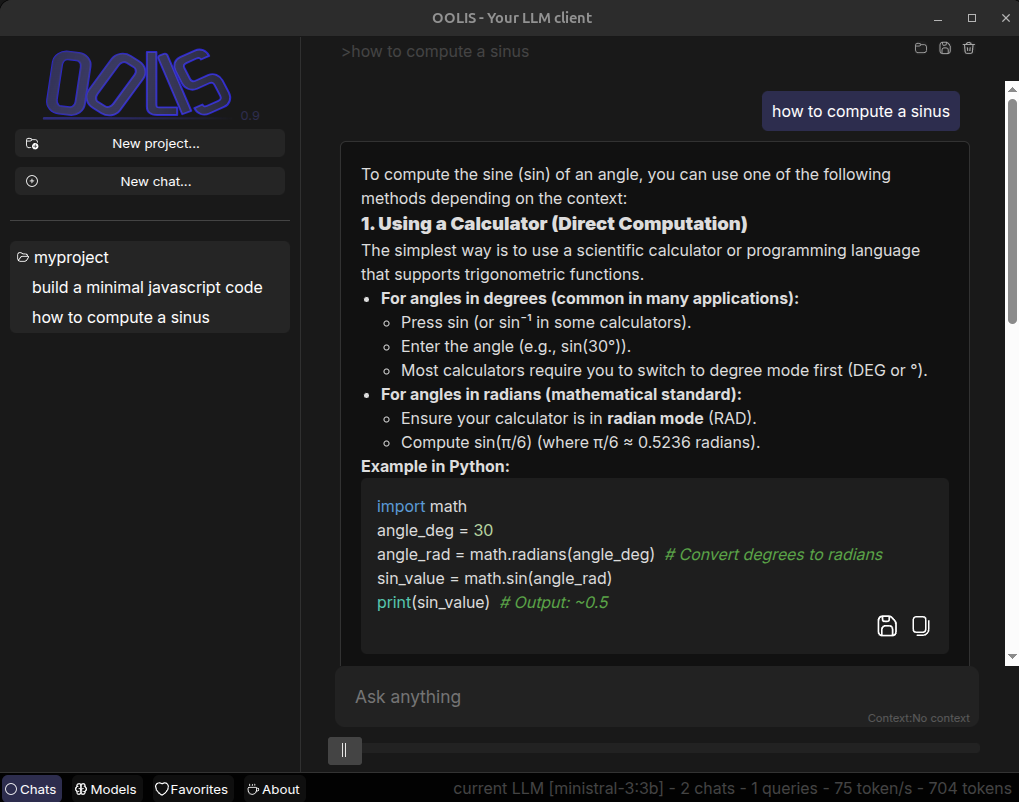
OOLIS - Local-first LLM client :
100% open source
Multi-provider support -> Switch between models depending on your needs
Project-based workflow -> Organize your conversations and contexts
Local-first approach -> Your data stays on your machine by default
Prompt library -> Save and reuse your best prompts and responses
Cross-platform -> Windows, Linux, macOS
Work with :

Ollama (local usage)
Ollama cloud
OpenAI
Anthropic
Google
MistralAI
Image

Why OOLIS ?

ools llm client

It provides simple project management and flexible model configuration. You can create as many projects as you want and assign different models to each one.

For example, you may use one model specialized for coding tasks and another one for casual conversations.

You can also easily save and retrieve your favorite prompts and responses.

Oolis is a cross-platform desktop LLM client built with Electron.

Platform Support :

  • Windows
  • Linux
  • macOS

Documentation

GitHub

Open source project available here:

https://github.com/AlexandreBrillant/oolis

Download

Version 0.9

From source (command line)

Clone the Github repository
git clone https://github.com/AlexandreBrillant/oolis.git
cd oolis
You need node.js on your machine

Install dependencies
npm install

Then you can run OOLIS !
npm run oolis

For Windows

When launching Oolis for the first time, Windows may display a warning saying that the application is from an unknown publisher.
This is expected: Oolis is an independent application and is not signed with a paid code-signing certificate.
Oolis is 100% open source and runs entirely locally. You can review the source code on GitHub before running it.

For x86:
oolis-setup.exe

For Linux

For x86 :
oolis.deb
oolis.rpm
For ARM :
oolis_aarch64.deb
oolis_aarch64.rpm

Contact me

Alexandre Brillant - SIRET 44163934100086
Want a feature ?
use OOLIS for a commercial usage ?
Contact me at : www.alexandrebrillant.com

© 2026 Alexandre Brillant